
Bubble size can keep playing time visible in a football scatter plot, but it does not replace an exposure filter or make a small sample reliable.
Learn when minutes belong in bubble size, how area can mislead, and how to combine exposure, X/Y metrics, labels and eligibility rules in one chart.
Two players sit in the top-right corner of a scatter plot. One has played nearly every minute; the other has appeared for the equivalent of six full matches. If the points look identical, the chart is hiding a decision-relevant difference.
Using minutes as bubble size can bring that exposure back into the picture. It is a useful third encoding when X and Y already describe performance rates and the reader needs to see how much playing time sits behind each point.
It is not a reliability adjustment. A larger circle means more minutes—not “more trustworthy” by mathematical proof.
Give Each Encoding One Job
A clear bubble chart can assign:
- X axis: the first performance measure;
- Y axis: the second performance measure;
- bubble size: minutes played;
- colour: league, position or another necessary group;
- labels: a small number of highlighted players.
Problems begin when colour, size and labels all repeat the same measure or when the bubble metric has no role in the question.
Write the sentence first:
I want to find players who combine chance creation and ball progression, while keeping their playing-time sample visible.
Minutes now have a reason to occupy size.
Filter Before You Encode
Bubble size should not replace a minimum-minutes filter. Without a floor, a player with a few exceptional substitute appearances can occupy the most attractive corner, represented by a tiny circle that many readers overlook.
Set a defensible exposure rule before looking at the result. Keep the lower-sample players if discovery is the goal, but label the uncertainty or use a separate panel. For a completed-season ranking, a stricter rule may be appropriate.
The guide to comparing players with unequal minutes explains why rates and exposure must be shown together.
Area Is Not Read Linearly
Readers perceive the area of a circle, not just its radius. If the radius is scaled directly to minutes, the visual difference can become exaggerated. A good charting implementation should scale bubbles so their area corresponds sensibly to the underlying value.
Even then, exact minute lookup from circle size is difficult. Put precise minutes in a tooltip, label or caption for highlighted players. Use size for pattern, not arithmetic.
A Real Bubble Chart With an Explicit Size Metric
The FBPlot export below uses bubble size for Key Passes rather than minutes. That makes it a useful counterexample: the legend explicitly tells the reader what size means, and the title/subtitle describe the player pool.
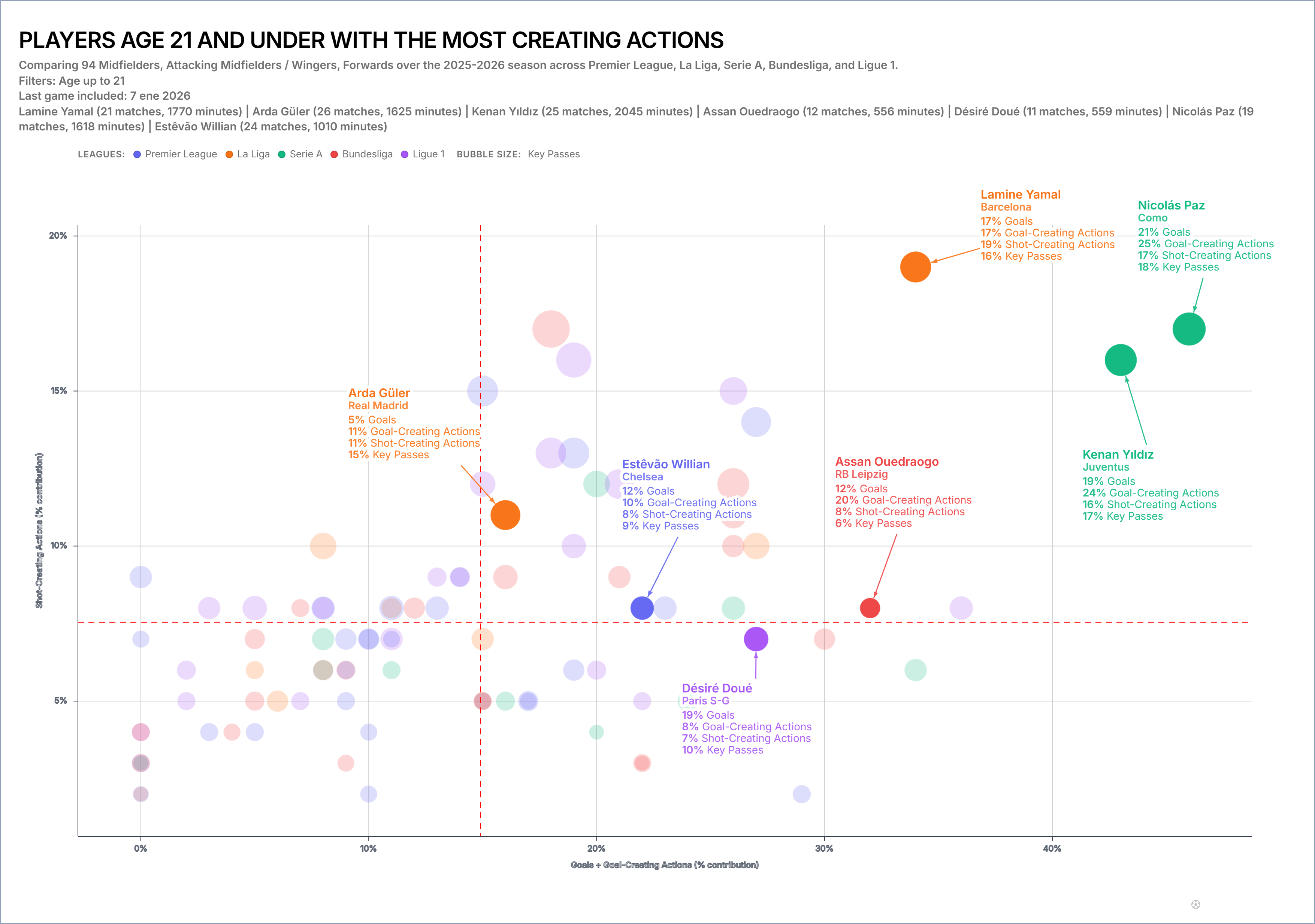
Changing the size measure changes what the reader notices. It should not silently change the analytical claim.
When Minutes Are the Right Third Variable
Minutes work well as bubble size when:
- X and Y are per-90 rates;
- the sample varies materially across players;
- availability is relevant to the decision;
- the chart is used for screening rather than exact ranking;
- the player pool remains readable after filtering.
Minutes add less when X or Y already uses total output, because exposure is partly embedded in the axis. In that case size may duplicate the same advantage.
When Minutes Are the Wrong Choice
Choose another approach when the bubbles overlap so heavily that points disappear, when precise exposure comparison is central, or when the chart already contains too many encodings.
A plain scatter with a minimum-minutes filter and a separate minutes table can be clearer. So can two panels: one performance scatter and one availability bar.
The goal is not to use every control in the editor. It is to make the denominator hard to miss.
Highlight Without Distorting
Label only the players the article discusses. A full population gives context; a handful of labels creates a reading path.
Do not enlarge highlighted bubbles independently of the minutes scale. Use outline, colour or annotation for emphasis. Otherwise visual prominence is mistaken for more playing time.
If league colour is also present, check contrast and use non-colour cues in the caption. The highlighted player should remain identifiable in grayscale and on mobile.
A Reproducible Configuration
Record:
- X, Y and bubble metric IDs;
- total or per-90 mode for each axis;
- competition and position filters;
- minimum minutes and matches;
- period and data cutoff;
- bubble scaling and opacity;
- highlighted players;
- any quadrant lines.
The scatter-plot tutorial covers the full creation flow. This manifest ensures another analyst can rebuild the specific version.
Once the exposure encoding is stable, use scatter quadrants only when the threshold has a defensible meaning. Treat any isolated point with the investigation sequence in football scatter plot outliers before turning it into a scouting story.
The Caption Should State the Denominator
Use a sentence such as:
Each point is a player; X and Y show per-90 rates for the selected period, circle area represents minutes played, and only players above the stated exposure threshold are included.
That caption prevents the bubble from becoming a vague symbol of importance.
Open the FBPlot bubble chart workflow, choose minutes as the third measure, and compare the result with a plain scatter. Keep the bubble version only if the exposure pattern changes how the reader understands the shortlist.
Found this helpful? Share it with your network
More Articles
How to Investigate Outliers in a Football Scatter Plot
An isolated football scatter point is a question, not an answer. Check sample, role, data quality and match context before calling it a scouting discovery.
Football Scatter Plot Quadrants Without Arbitrary Winners
Quadrant lines organise a football scatter plot, but the threshold and axis direction determine whether “top right” has any useful meaning.